What’s the Difference Between CapCut and CapCut Pro?


The main difference between CapCut and CapCut Pro is that CapCut is the free version of the video editing app, while CapCut Pro is the paid subscription that unlocks premium editing tools, exclusive templates, advanced effects, more cloud storage, and additional creative features. In simple terms, CapCut is enough for basic video editing, but CapCut Pro is better for creators, marketers, freelancers, and businesses that want faster editing and more professional-looking videos.
If you only need to cut clips, add text, use simple transitions, and post casual videos, the free version of CapCut may already be enough. But if you create content regularly for TikTok, Instagram Reels, YouTube Shorts, ads, or client work, CapCut Pro can help you save time and access more premium assets.
In this guide, we’ll break down the difference between CapCut Free and CapCut Pro, compare their features, explain who should use each version, and help you decide whether upgrading is worth it. If you are already comparing the value of the paid plan, you may also want to read our full guide on whether CapCut Pro is worth it.
CapCut vs CapCut Pro: Quick Comparison
| Feature | CapCut Free | CapCut Pro |
|---|---|---|
| Basic video editing | Available | Available |
| Cut, trim, and merge clips | Available | Available |
| Text, captions, and subtitles | Basic tools available | More advanced and premium options |
| Templates | Free templates available | Premium templates unlocked |
| Effects and filters | Basic effects and filters | Premium effects, filters, and body effects |
| AI tools | Some AI features available | More advanced AI-powered tools depending on plan and platform |
| Cloud storage | Limited or basic storage depending on region/platform | Expanded cloud storage; CapCut states Pro plans include 100GB cloud storage |
| Best for | Beginners and casual users | Creators, marketers, freelancers, and businesses |
| Price | Free | Paid subscription |
What Is CapCut?
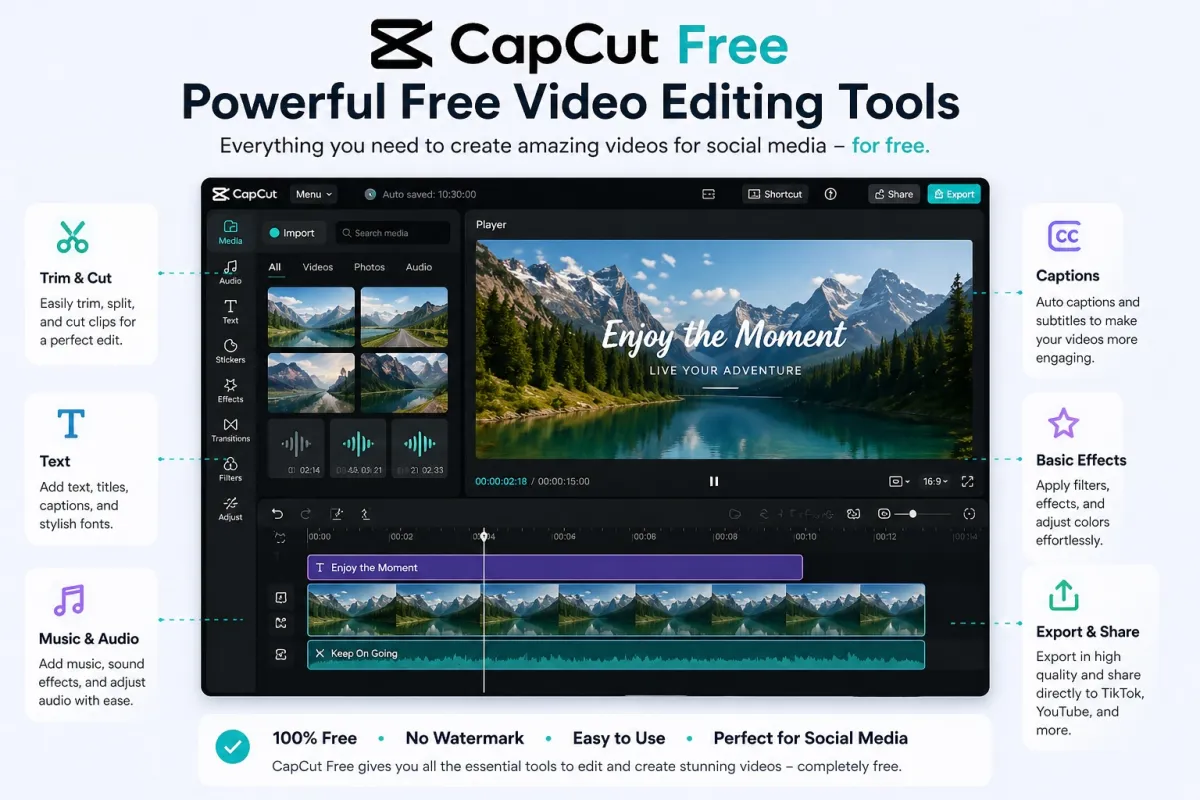
CapCut is a popular video editing app used for creating short-form videos, social media content, ads, tutorials, vlogs, and personal videos. It is widely used by creators on platforms like TikTok, Instagram Reels, YouTube Shorts, Facebook, and other social media channels.
The free version of CapCut gives users access to essential video editing tools. You can cut and trim clips, add text, use transitions, apply effects, add music, create captions, adjust speed, and export videos for social media. CapCut’s official website describes its editor as a free online video editor with AI tools for cutting, trimming, adding transitions, subtitles, and exporting videos for platforms like YouTube, TikTok, and Reels.
According to CapCut’s app listing, the app includes easy-to-use editing functions, fonts, effects, keyframe animation, smooth slow motion, chroma key, stabilization, auto captions, text-to-speech, motion tracking, and background removal. This makes the free version powerful enough for many beginner and casual editing needs.
You can learn more from CapCut’s official website here: CapCut official website.
What Is CapCut Pro?
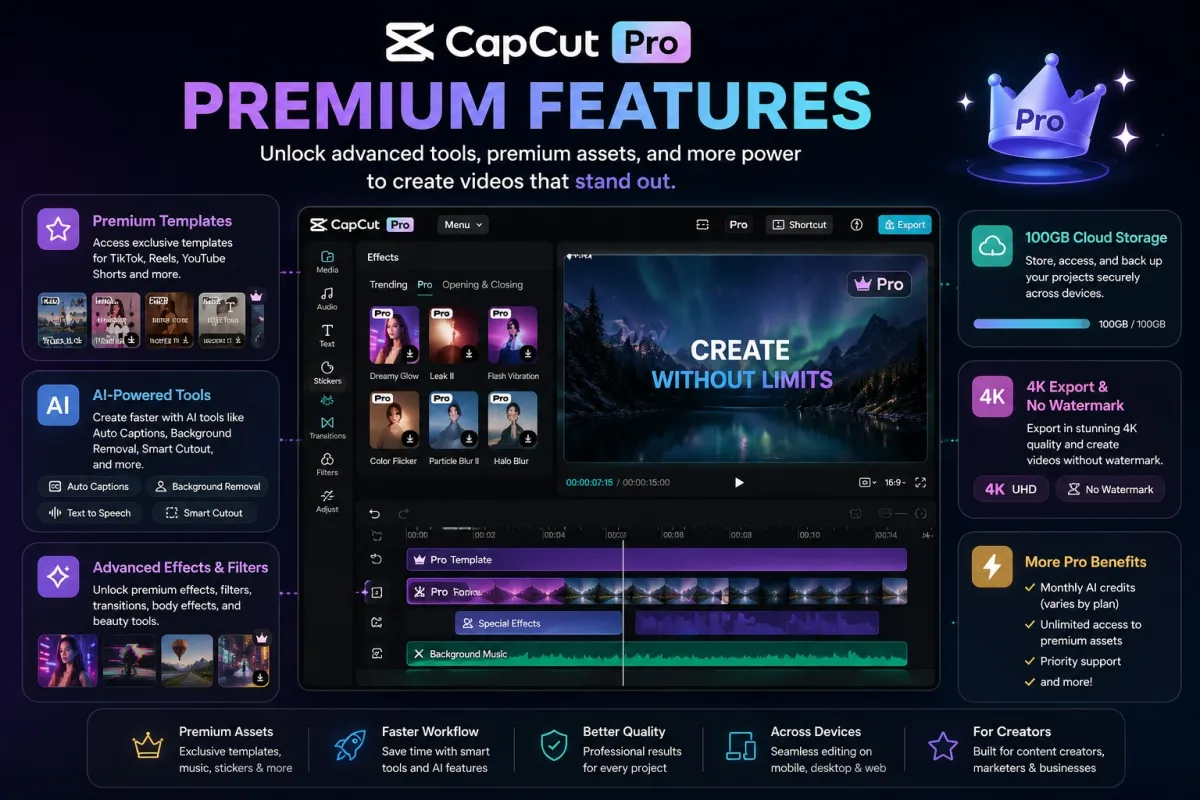
CapCut Pro is the premium version of CapCut. It is designed for users who want more advanced features, premium creative assets, better workflow tools, and more storage for their projects.
CapCut’s official help page states that CapCut Pro unlocks premium features such as text templates, video effects, body effects, filters, and 100GB of cloud storage through its monthly and yearly plans. Another official CapCut page explains that CapCut Pro can unlock advanced editing tools, 4K/60fps export, no watermarks, exclusive templates, monthly AI credits depending on the plan, and expanded cloud storage.
This means CapCut Pro is not just about having “more effects.” It is mainly about faster content production, more polished visuals, and access to premium creative tools that can help creators produce better videos with less manual work.
If you are looking for a more affordable way to access CapCut Pro, you can check Dpremi’s CapCut Pro offer here: CapCut Pro on Dpremi.
Main Differences Between CapCut and CapCut Pro
1. Free Access vs Paid Subscription
The most obvious difference is the price. CapCut Free can be used without paying for a subscription, while CapCut Pro requires a paid plan. The free version gives you enough tools to edit normal videos, while the Pro version is made for users who need premium features and more professional creative assets.
Pricing can vary depending on country, device, platform, taxes, and promotions. For a deeper breakdown, read our guide to CapCut price.
2. Basic Editing Tools vs Premium Creative Assets
CapCut Free already includes many useful editing features. You can trim videos, split clips, add text, use music, insert transitions, apply filters, and create simple social media videos.
CapCut Pro, however, gives you access to more premium templates, effects, filters, and design elements. This is useful if you want your content to look more polished without creating every effect manually from scratch.
For example, if you are editing a personal travel video, CapCut Free may be enough. But if you are creating daily TikTok content, Instagram ads, brand videos, or client projects, premium templates and effects can help you create better output faster.
3. Standard Workflow vs Faster AI-Powered Editing
CapCut includes several AI-powered tools even in its broader editing ecosystem, such as auto subtitles, background removal, and AI-assisted video creation features. However, CapCut Pro is more focused on giving users access to advanced creative tools and premium AI-related features depending on the plan and platform.
This matters because modern content editing is not only about cutting clips. Many creators now need to generate captions, remove backgrounds, resize videos, enhance visuals, create short-form versions, and publish quickly. CapCut Pro can make this workflow more efficient for users who create content consistently.
4. Free Templates vs Premium Templates
Templates are one of the biggest reasons many users choose CapCut. They make video editing faster because you do not need to build the structure, timing, transitions, and visual style manually.
CapCut Free gives access to free templates, but some premium templates and assets are locked behind CapCut Pro. If you often see a template, effect, or design element marked as Pro, you will need a Pro subscription to use it fully.
This is especially useful for content creators who follow trends. When a trending template appears, being able to use premium assets immediately can help you publish faster and stay relevant.
5. Casual Use vs Creator and Business Use
CapCut Free is ideal for casual users. If you only edit videos occasionally, make simple social media clips, or create content for fun, the free version should be enough.
CapCut Pro is better for people who use video content as part of their work or growth strategy. This includes content creators, affiliate marketers, social media managers, small business owners, freelancers, online sellers, and video editors.
If video content helps you attract customers, build an audience, promote a product, or deliver client work, then the extra tools in CapCut Pro may be easier to justify.
Is CapCut Free Enough?
Yes, CapCut Free is enough for many users. If your goal is to make simple videos, cut clips, add music, insert text, and post casual content, you may not need CapCut Pro immediately.
CapCut Free is suitable if you:
Edit videos only occasionally
Create simple TikTok, Reels, or Shorts content
Do not need premium templates or effects
Are still learning video editing
Want to avoid subscription costs
Only need basic captions, transitions, and filters
For beginners, it is usually better to start with the free version first. Once you understand your editing needs and start hitting limitations, then you can decide whether Pro is worth upgrading to.
When Should You Upgrade to CapCut Pro?
You should consider upgrading to CapCut Pro when video editing becomes part of your regular workflow. If you create content every week or every day, the time saved from premium templates, effects, and AI tools can be valuable.
CapCut Pro may be worth it if you:
Create videos consistently for social media
Need premium templates and effects
Want your videos to look more professional
Edit content for clients or business use
Need faster production for ads, product videos, or short-form content
Want more cloud storage for projects
Often see Pro assets locked in the editor
Want access to more advanced creative tools
For a more detailed explanation, read our complete guide: Is CapCut Pro worth it?
CapCut vs CapCut Pro for Different Users
For Beginners
Beginners should usually start with CapCut Free. It already provides enough tools to learn the basics of video editing, including cutting clips, adding text, using transitions, and exporting videos.
Once you become more comfortable and start wanting more premium templates, better effects, or faster editing, upgrading to CapCut Pro can make more sense.
For Content Creators
Content creators can benefit more from CapCut Pro because they often need to produce videos quickly and consistently. Premium templates, effects, filters, and AI tools can help creators maintain a more professional visual style without spending too much time on manual editing.
If you publish TikTok videos, Instagram Reels, YouTube Shorts, or Facebook videos regularly, CapCut Pro can be useful for improving speed and quality.
For Small Businesses
Small businesses can use CapCut Free for basic promotional videos, product clips, and social media posts. However, CapCut Pro is more useful if the business needs better-looking ads, branded videos, promotional content, or regular social media campaigns.
A small business that posts videos weekly may benefit from Pro because it reduces editing time and gives access to more professional creative assets.
For Freelancers and Client Work
Freelancers who edit videos for clients may find CapCut Pro more valuable because client work usually requires faster delivery, better visuals, and more editing flexibility.
If a premium template or effect helps you finish client videos faster, the subscription can pay for itself through saved time and better output quality.
CapCut Pro Pricing: How Much Does It Cost?
CapCut Pro pricing can vary by region, platform, billing method, and promotion. CapCut officially offers monthly and yearly Pro plans, and its help center states that both plans unlock premium features such as text templates, video effects, body effects, filters, and 100GB of cloud storage.
Because pricing can change, you should always check the latest price in your country and platform before subscribing. You can also read our updated guide on CapCut price to better understand the cost and value of CapCut Pro.
If you want a more affordable option, Dpremi offers CapCut Pro access here: https://dpremi.com/product/capcut.
CapCut Free vs CapCut Pro: Which One Should You Choose?
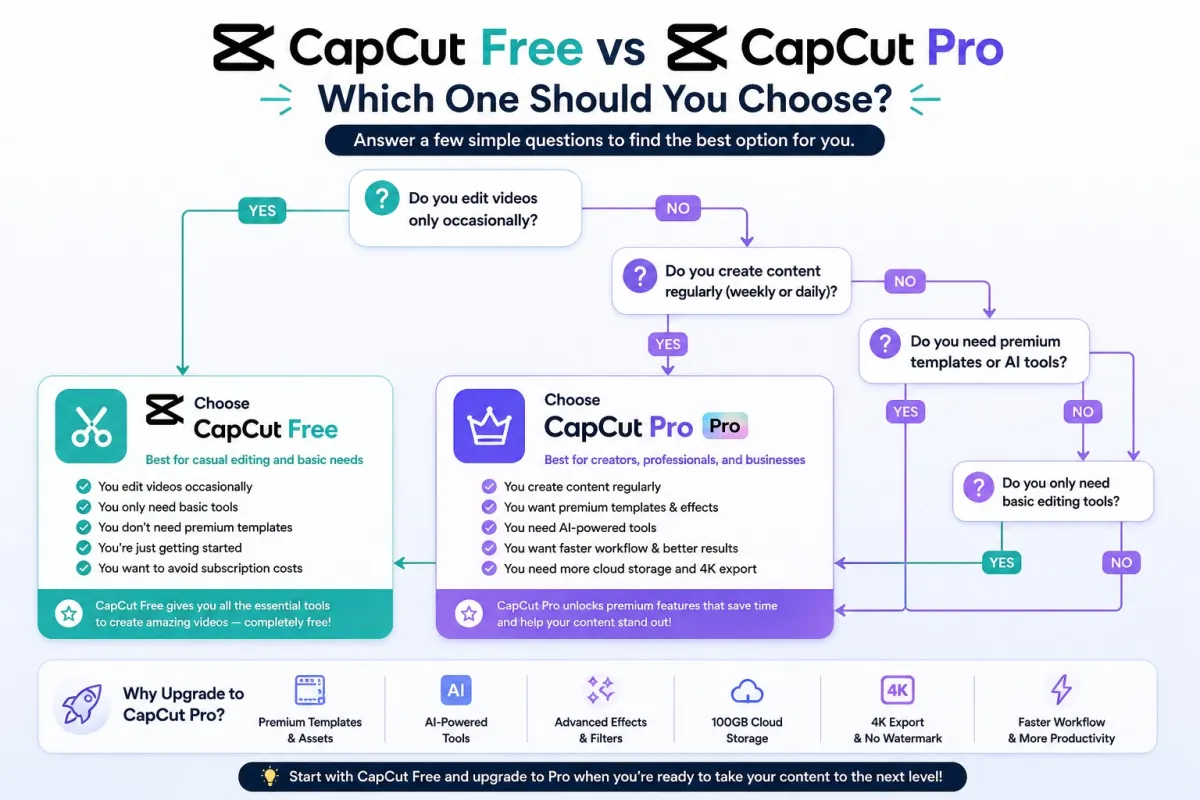
Choose CapCut Free if you are a beginner, casual user, student, or someone who only edits videos occasionally. It is also a good choice if you want to learn editing without paying for a subscription.
Choose CapCut Pro if you create videos regularly, need premium templates, want better effects, use video content for business, or want to save time with more advanced tools.
Choose CapCut Free If:
You are new to video editing
You only edit videos for fun
You do not need premium templates
You rarely publish content
You want to avoid monthly costs
Choose CapCut Pro If:
You create content consistently
You want premium effects, filters, and templates
You edit videos for business or clients
You want faster editing workflow
You need more cloud storage
You want more polished and professional-looking videos
Is CapCut Pro Worth It?
CapCut Pro is worth it if it helps you save time, improve video quality, or create content that supports your income, business, or audience growth. For example, if Pro features help you create better ads, client videos, product videos, or daily short-form content, the subscription can be a practical investment.
However, if you only edit simple videos occasionally, CapCut Free is probably enough. The best approach is to start with the free version, identify the limitations you face, and upgrade only when the Pro features solve a real problem for your workflow.
If you want to compare the value in more detail, read this guide: Is CapCut Pro worth it?
FAQs About CapCut and CapCut Pro
What’s the difference between CapCut and CapCut Pro?
CapCut is the free version with basic video editing tools, while CapCut Pro is the paid version that unlocks premium templates, advanced effects, filters, body effects, more cloud storage, and additional creative tools. CapCut Free is best for casual editing, while CapCut Pro is better for creators and businesses.
Is CapCut Pro better than CapCut?
Yes, CapCut Pro is better if you need premium assets, faster editing, more advanced tools, and a more professional content workflow. However, CapCut Free is still good enough for basic editing and casual video creation.
Can I use CapCut without Pro?
Yes. You can use CapCut without Pro. The free version includes many basic editing features such as trimming, cutting, text, music, captions, filters, transitions, and export options.
Does CapCut Pro remove all limitations?
CapCut Pro unlocks many premium features and assets, but the exact benefits can depend on your platform, region, and subscription plan. Always check the current CapCut Pro plan details before subscribing.
Is CapCut Pro good for TikTok and Instagram Reels?
Yes. CapCut Pro is especially useful for short-form content creators because it gives access to premium templates, effects, filters, and tools that can make TikTok videos, Instagram Reels, and YouTube Shorts look more polished.
Is CapCut Pro worth it for beginners?
Beginners do not always need CapCut Pro immediately. It is better to start with CapCut Free first. Once you create videos more often and need premium templates or faster editing tools, then CapCut Pro becomes more useful.
Where can I get CapCut Pro?
You can subscribe through CapCut directly, depending on your device and region. If you are looking for a more affordable option, you can also check Dpremi’s CapCut Pro product page here: https://dpremi.com/product/capcut.
Final Verdict: CapCut vs CapCut Pro
The difference between CapCut and CapCut Pro comes down to editing needs. CapCut Free is a great option for beginners and casual users who need basic editing tools. CapCut Pro is better for creators, marketers, freelancers, and businesses that need premium templates, advanced effects, more storage, and a faster workflow.
If you only edit simple videos occasionally, stay with CapCut Free. But if you create content regularly and want better output with less editing time, CapCut Pro is worth considering.
For users who want to access CapCut Pro at a more affordable price, you can explore Dpremi’s CapCut Pro offer here: Get CapCut Pro on Dpremi.