Is It Worth Paying for CapCut Pro? A Practical Guide for Creators


Yes, CapCut Pro is worth paying for if you create videos regularly, need premium templates, want faster editing with AI-powered tools, or want more professional-looking exports. However, if you only edit casual videos once in a while, the free version of CapCut may already be enough. The real value of CapCut Pro depends on how often you edit, what type of content you create, and whether premium features can save you time or improve your final video quality.
Quick Answer: Is CapCut Pro Worth It?
CapCut Pro is worth it for content creators, TikTok editors, Instagram Reels creators, YouTubers, small businesses, freelancers, and marketing teams who publish videos consistently. The subscription becomes more valuable when video editing is part of your workflow, not just something you do occasionally.
The main reason people pay for CapCut Pro is simple: it helps them create better videos faster. With access to premium templates, effects, AI-powered editing tools, larger cloud storage, and higher-quality export options, CapCut Pro can reduce editing time and help your content look more polished.
But if you only need basic trimming, captions, simple transitions, and casual edits, CapCut Free is still a strong option. You should only upgrade when you repeatedly feel limited by the free version.
What Do You Get With CapCut Pro?
CapCut Pro is designed for users who want more than basic editing. According to CapCut, Pro gives users access to premium tools, advanced editing features, AI-powered enhancements, premium creative assets, and cloud storage depending on the plan and platform.
1. Premium Templates and Effects
One of the biggest reasons creators use CapCut is its template-based workflow. Templates make it easier to create TikTok videos, Instagram Reels, YouTube Shorts, product promos, and social media ads without starting from scratch.
With CapCut Pro, users can access more premium templates, video effects, transitions, filters, text styles, and other creative assets. This is especially useful if you want your content to look more modern, trendy, and professional without spending too much time designing everything manually.
2. AI-Powered Editing Tools
CapCut Pro also gives users access to more AI-powered editing features. These tools can help speed up repetitive editing tasks, improve visuals, enhance content, and make the editing process easier for creators who publish frequently.
For social media creators, AI tools can be valuable because speed matters. If you are creating multiple videos per week, every feature that helps you edit faster can make a real difference.
3. Better Export Options
Export quality matters if you use videos for business, brand content, ads, or professional social media pages. CapCut Pro can provide better export options such as higher-quality video exports where available. Some CapCut Pro resources also mention 4K export and no-watermark benefits depending on plan, feature, and platform.
This matters because low-quality exports can make even a good video look less professional. If your content represents your personal brand, business, or client work, better export quality is often worth paying for.
4. Cloud Storage and Cross-Device Workflow
CapCut is available across mobile, desktop, and web. For creators who edit on more than one device, cloud storage can be very useful. CapCut’s official plan information mentions that annual subscribers can get access to premium tools, regular updates, and 100GB cloud storage.
This is helpful if you start editing on your phone, continue on your laptop, or manage many creative projects at once. For frequent creators, better storage and project access can make the workflow smoother.
CapCut Free vs CapCut Pro: What Is the Real Difference?
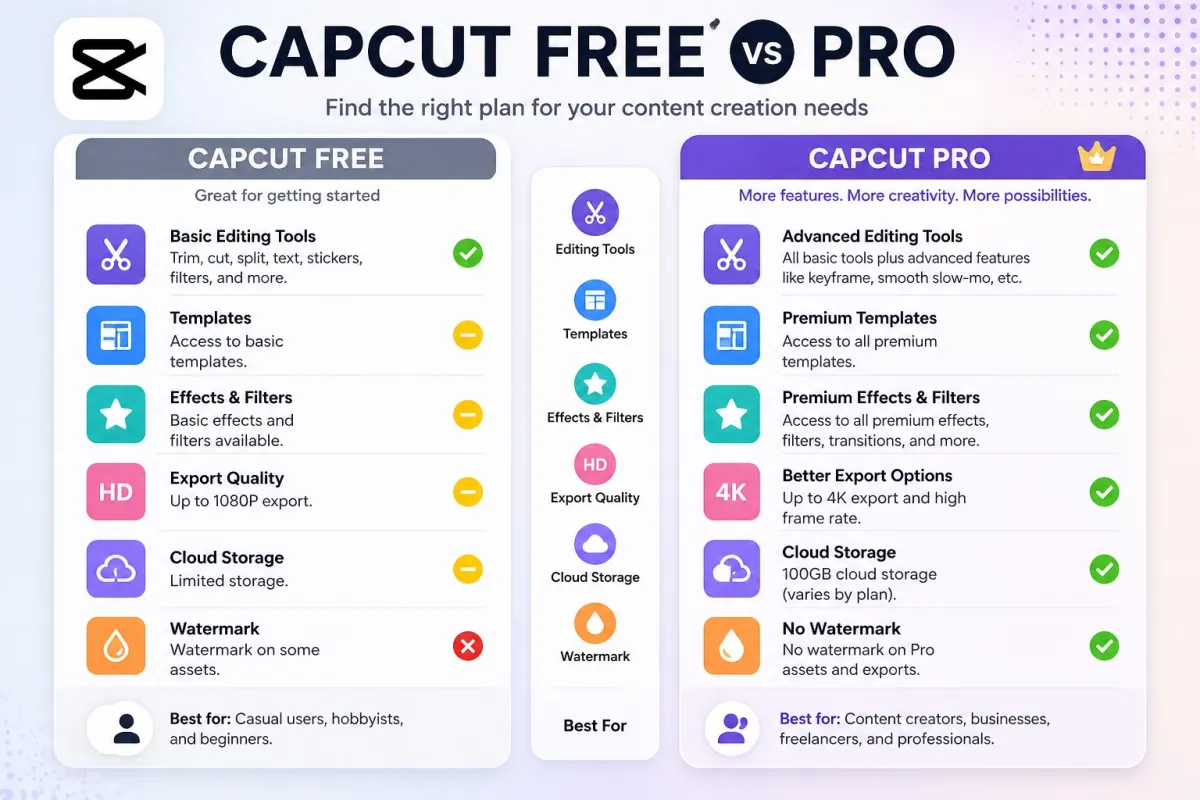
CapCut Free is already powerful enough for many basic editing needs. You can trim clips, add text, use basic effects, create captions, and edit short-form videos. That is why many beginners start with the free version first.
The difference is that CapCut Pro is built for users who want more speed, more premium creative assets, and more professional output.
| Feature | CapCut Free | CapCut Pro |
|---|---|---|
| Basic editing tools | Available | Available |
| Templates | Limited access | More premium templates |
| Effects and filters | Basic and limited options | More premium effects and filters |
| AI tools | Limited access | More advanced AI-powered features |
| Export quality | Good for basic use | Better for professional content |
| Cloud storage | Limited | Larger storage, depending on plan |
| Best for | Casual users and beginners | Creators, businesses, freelancers, and marketers |
In short, CapCut Free is good for learning and casual editing. CapCut Pro is better for serious content creation, faster workflows, and more polished results.
Who Should Pay for CapCut Pro?
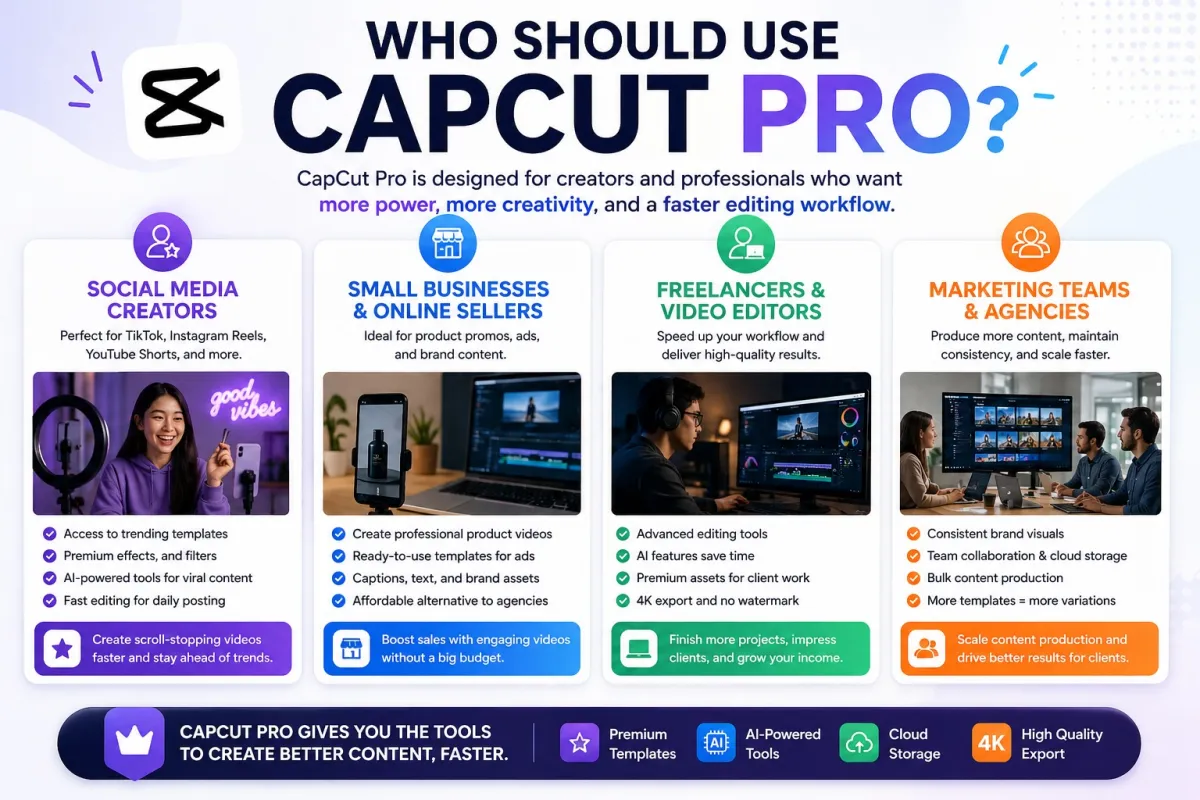
CapCut Pro is not necessary for everyone. But for some users, it can be a smart investment.
1. Social Media Creators
If you create TikTok videos, Instagram Reels, YouTube Shorts, or other short-form content regularly, CapCut Pro can be worth it. Premium templates and effects can help you keep up with trends faster.
Short-form video is highly competitive. Your content needs to look attractive quickly, especially in the first few seconds. CapCut Pro can help creators produce more visually engaging videos without spending too much time editing from scratch.
2. Small Businesses and Online Sellers
Small businesses often need product videos, promo videos, ads, customer testimonials, and educational content. Hiring a professional video editor for every small campaign can be expensive.
CapCut Pro can be useful for small business owners who want to create better marketing videos in-house. With templates, effects, captions, and AI-powered tools, businesses can create more content without building a large creative team.
3. Freelancers and Video Editors
Freelancers who edit videos for clients may also benefit from CapCut Pro. Premium assets and faster editing tools can help increase output and reduce manual work.
If CapCut Pro helps a freelancer finish client videos faster, the subscription cost may be easier to justify. Time saved can become money saved.
4. Marketing Teams and Agencies
Marketing teams often need to create many versions of the same content for different platforms. For example, one campaign may need videos for TikTok, Instagram Reels, YouTube Shorts, Facebook, and paid ads.
CapCut Pro can help teams create variations quickly using templates, effects, and reusable workflows. This makes it useful for agencies and brands that produce content consistently.
Who Probably Does Not Need CapCut Pro?
CapCut Pro may not be worth it if you only edit videos occasionally. If your needs are simple, the free version may already be enough.
You probably do not need CapCut Pro if:
You only edit personal videos once in a while.
You rarely use templates, effects, or premium assets.
You do not need high-quality exports for professional use.
You are still learning basic video editing.
You are not publishing content consistently.
You do not need cloud storage or cross-device project access.
A good rule is to start with CapCut Free first. If you keep seeing locked Pro features that you actually need, then upgrading may make sense.
Is CapCut Pro Good for TikTok, Instagram Reels, and YouTube Shorts?
Yes, CapCut Pro is especially useful for short-form video platforms such as TikTok, Instagram Reels, and YouTube Shorts. These platforms reward content that is fast, clear, visually engaging, and easy to watch.
CapCut became popular because it makes short-form editing simple. Templates, captions, transitions, filters, and effects help creators produce videos quickly. With Pro, users get access to more creative options, which can help content stand out.
The demand for short-form editing tools is also growing. Meta launched Instagram Edits, a CapCut-like video creation app for creators, which shows how important mobile-first video editing has become for social media platforms.
This does not mean every creator must pay for CapCut Pro. But if short-form video is part of your growth strategy, Pro features can help you produce content more efficiently.
How Much Does CapCut Pro Cost?
CapCut Pro pricing can vary depending on country, platform, subscription type, promotion, and billing method. The price you see on mobile may also differ from the price shown on desktop or web.
Before subscribing, it is a good idea to understand the latest pricing structure and compare whether the monthly or yearly plan makes more sense for your needs. You can read our updated guide on CapCut price to understand the cost before upgrading.
If you only need CapCut Pro for a short project, monthly access may be enough. But if you create videos regularly throughout the year, a longer plan may offer better value.
How to Access or Log In to CapCut Pro
If you already have CapCut Pro but the premium features do not appear, the issue may be related to login. Many users accidentally log in with a different account than the one connected to their subscription.
For example, you may have subscribed using Google login but later opened CapCut using Apple, TikTok, Facebook, or another email. In that case, CapCut may not recognize your Pro access.
If this happens, make sure you are using the correct login method and account. You can follow this CapCut login guide to avoid common login mistakes and access your account properly.
Is There a More Affordable Way to Get CapCut Pro?

Many users want CapCut Pro but also want a more affordable way to access premium features. This is understandable, especially for students, new creators, small businesses, and freelancers who are still managing their budget.
However, you should be careful when choosing where to buy digital subscriptions. Always look for a provider that gives clear product information, support, and a warranty or replacement policy if there is an access issue.
If you want CapCut Pro access at a more affordable price, you can check CapCut Pro on Dpremi. It can be a practical option for users who want premium access without overcomplicating the buying process.
Dpremi is useful for users who want a simpler way to access premium digital products with clear pricing, warranty information, and support.
This is a good fit if you want to try CapCut Pro for content creation, business videos, social media editing, or client projects while keeping your subscription cost more manageable.
Pros and Cons of Paying for CapCut Pro
Pros of CapCut Pro
Helps you create videos faster.
Gives access to more premium templates and effects.
Useful for TikTok, Instagram Reels, and YouTube Shorts creators.
Can improve the look of business and marketing videos.
Provides access to more AI-powered editing tools.
Better for frequent creators and professional workflows.
Cloud storage can make cross-device editing easier.
Cons of CapCut Pro
Not necessary for casual users.
The subscription may not be worth it if you rarely edit videos.
Some users may only need one or two Pro features.
Pricing and feature availability can vary by region or platform.
Beginners may not use all premium tools immediately.
When Is CapCut Pro Actually Worth the Money?
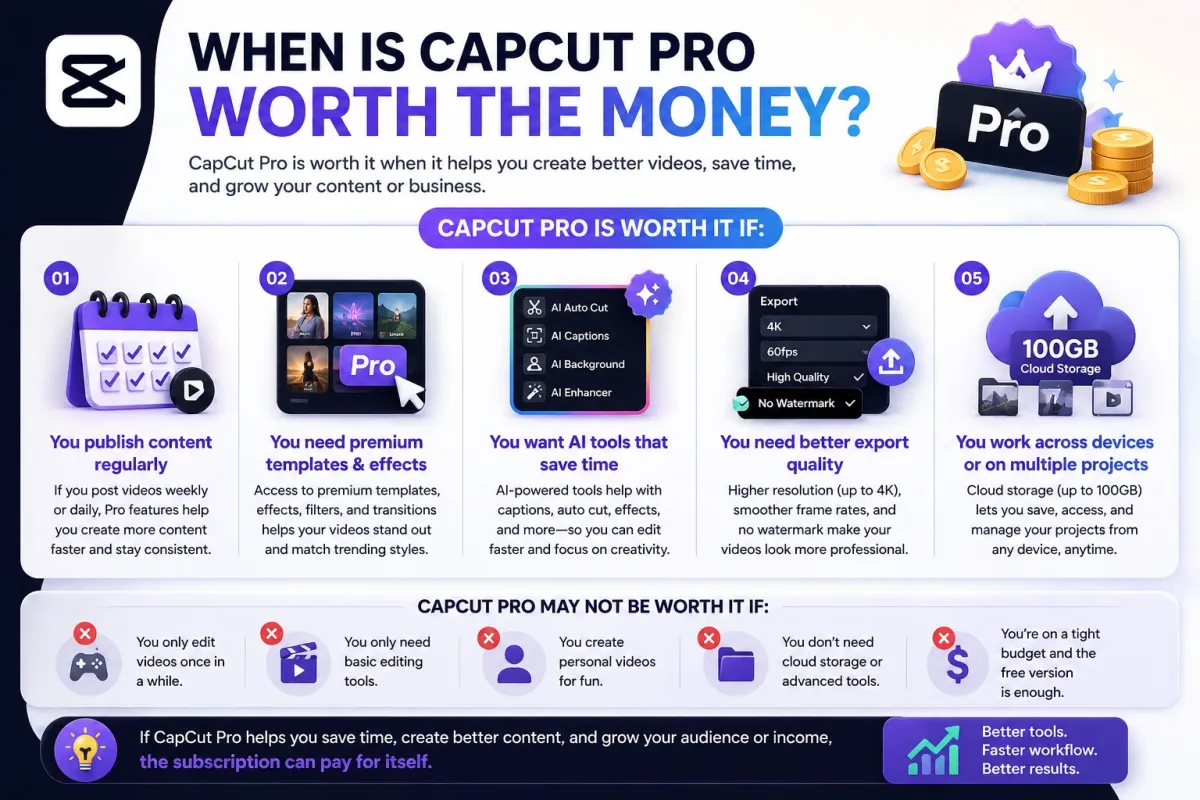
CapCut Pro is most worth it when it helps you publish more content, save editing time, or create videos that support your income. For example, if Pro features help you create better client videos, social media ads, or daily short-form content, the subscription can pay for itself through time saved and better output.
CapCut Pro vs Other Video Editing Tools
CapCut Pro is not the only video editing tool available. There are alternatives such as Adobe Premiere Pro, DaVinci Resolve, Final Cut Pro, Canva, and Instagram Edits. However, CapCut is especially strong for fast short-form video editing.
Advanced tools like Adobe Premiere Pro and DaVinci Resolve are better for professional long-form editing, films, complex color grading, and advanced production. But they also have a steeper learning curve.
CapCut Pro is easier for creators who want speed, templates, social media effects, captions, and quick exports. If your main goal is to create content for TikTok, Instagram Reels, YouTube Shorts, or product marketing, CapCut Pro may be more practical than traditional professional editing software.
You can also compare CapCut with other creator tools based on your content workflow. If speed and social media templates matter most, CapCut Pro is a strong choice. If cinematic editing and advanced post-production matter most, you may need a more advanced editing suite.
So, Is It Worth Paying for CapCut Pro?
CapCut Pro is worth paying for if video content is important to your personal brand, business, freelance work, or social media growth. The upgrade makes the most sense when you create videos regularly and need premium templates, better effects, AI-powered tools, improved export options, and smoother project management.
For casual users, CapCut Free is still enough. You do not need to pay if you only edit simple personal videos or rarely use premium features.
But for creators, marketers, online sellers, small businesses, and freelancers, CapCut Pro can be a smart upgrade. The biggest benefit is not just better features. It is the time saved and the ability to create more polished content consistently.
If you are ready to try premium editing features, you can explore CapCut Pro access on Dpremi and choose an option that fits your needs.
FAQ About CapCut Pro
Is CapCut Pro worth it for beginners?
CapCut Pro can be worth it for beginners who want to create better-looking videos quickly using templates, effects, and AI tools. However, beginners who are still learning basic editing may want to start with CapCut Free first.
Is CapCut Pro worth it for TikTok creators?
Yes, CapCut Pro is worth it for TikTok creators who post regularly and want faster editing, premium templates, trending effects, and better-looking videos. If you only post occasionally, the free version may be enough.
Can I use CapCut for free?
Yes, CapCut has a free version that is suitable for basic video editing. You can trim videos, add text, create captions, and use basic effects. CapCut Pro is for users who want more premium tools and creative assets.
Does CapCut Pro remove watermark?
CapCut Pro can provide no-watermark benefits for certain premium exports and features, depending on the plan, platform, and feature used. Always check the latest CapCut plan details before subscribing.
Is CapCut Pro good for business videos?
Yes, CapCut Pro can be useful for business videos, especially for product promos, ads, social media content, tutorials, and short-form marketing videos. It helps small businesses create content faster without hiring a full editing team.
Is CapCut Pro better than CapCut Free?
CapCut Pro is better if you need premium templates, more effects, AI tools, better export options, and larger cloud storage. CapCut Free is better if you only need simple editing tools and do not want to pay for a subscription.
Where can I get CapCut Pro at a more affordable price?
You can check CapCut Pro on Dpremi if you are looking for a more affordable way to access CapCut Pro. Make sure to choose a provider that offers clear information and support.