
Buying digital products online should be simple, fast, and secure. If you are looking for an easy way to purchase premium digital subscriptions such as Canva, ChatGPT, Netflix, or CapCut, Dpremi offers a straightforward process for global buyers.
The platform presents itself as a place to buy digital subscriptions at discounted prices, with product listings, reviews, FAQs, and support options available directly on the site.
In this guide, you will learn exactly how to buy digital products on dpremi.com, from creating an account to receiving your premium access after payment.
Why Many Buyers Choose Dpremi
Before purchasing, it helps to know what the platform offers. On its products page, dpremi highlights multiple digital subscription options, including ChatGPT, Netflix, Canva, and CapCut, and describes itself as a globally trusted and affordable premium account provider.
For example, the Canva product page shows:
Multiple plan types,
Several subscription durations,
Instant delivery messaging,
Warranty information,
A secure checkout message,
FAQ section explaining how activation works.
That makes the process easier for international customers who want a quick overview before buying.

How to Buy Digital Products on Dpremi
Step 1: Create Your dpremi Account
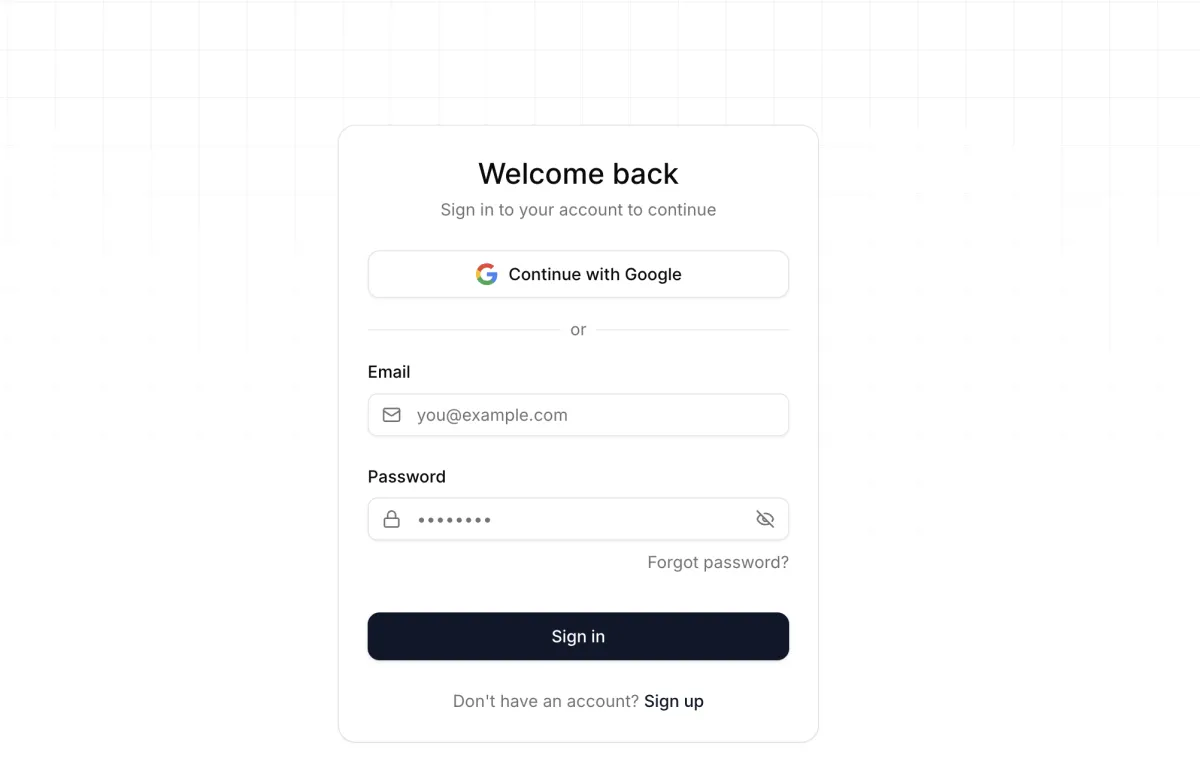
To start, go to the login page at Dpremi. The sign-in page includes a “Continue with Google” option, along with standard email and password fields. This gives new users a quick way to register and access their account.
Visit login page dpremi.
Choose Continue with Google for a faster signup process, or use email registration if you prefer.
Complete your account setup and sign in.
Using Google login can be especially convenient for overseas buyers who want to avoid filling out a long signup form.
Step 2: Browse the Available Products
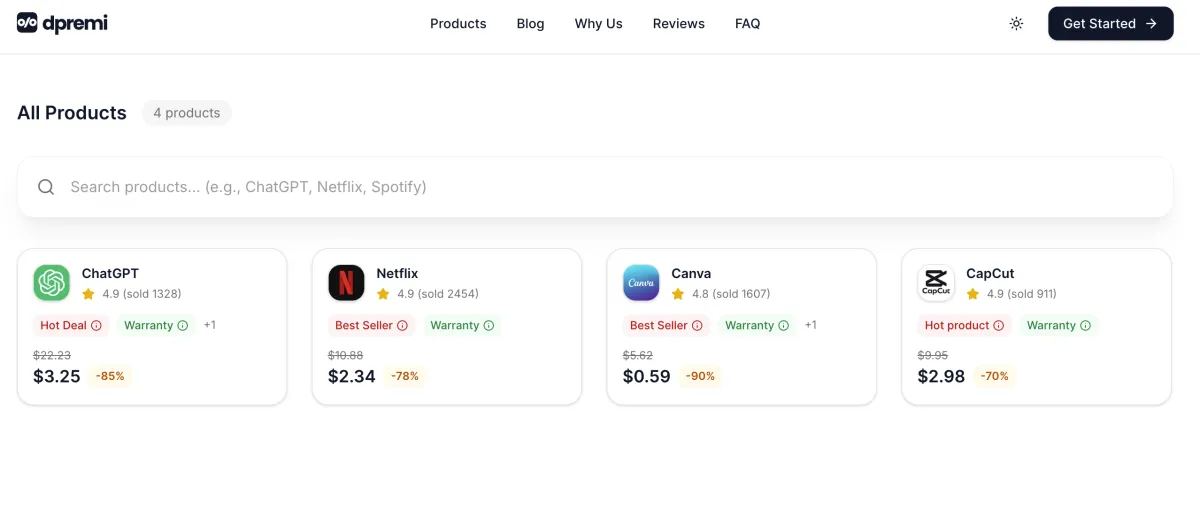
Once you are logged in, head to the products page. Dpremi currently lists products such as ChatGPT, Netflix, Canva, and CapCut on its main product catalog.
Open the products page.
Browse the available subscriptions.
Click the product you want to purchase.
This page is useful because it lets you compare available products in one place before making a decision.

Step 3: Select the Product Type You Want
Let’s use Canva as an example.
On the Canva product page, dpremi offers different types such as Canva Education and Canva Pro Team, along with multiple durations including 1 month, 3 months, 6 months, and 12 months. The page also shows product benefits, pricing ranges, reviews, and warranty-related information.
Open the product page for your chosen item.
Select the available type.
Choose the subscription duration that fits your needs.
Click Buy Now.
This step matters because many digital products come with different access models or plan lengths, so choosing the right option helps avoid confusion later.
Related Article: How to Get Canva Pro Free Access on Dpremi
Step 4: Complete Payment Securely
According to your purchase flow, dpremi supports two payment methods for buyers:
PayPal
Credit card
That is helpful for international customers, since both methods are widely used for cross-border online payments.
After selecting your product and clicking Buy Now, proceed to checkout and choose the payment method that works best for you.
The Canva product page also states “Secure checkout with 100% money-back guarantee,” which can help reassure first-time buyers.
Step 5: Receive Your Access After Payment
After a successful payment, your access details are delivered quickly.
The Canva page states that most orders come with Instant Delivery, and once payment is confirmed, the user receives an invitation link via email or dashboard for activation.
The same page also explains that activation is done through Canva’s official invitation system and that users do not need to provide their password.
Based on your purchase flow, customers also receive:
an email
and a WhatsApp message
This makes the post-purchase process simple and convenient, especially for buyers who want fast access without extra steps.
Example: How to Buy Canva on Dpremi
Here is a quick example of how to get Canva on the Dpremi:
Sign in or register on dpremi using Google or email.
Go to the products page and choose Canva.
Select the Canva type and preferred duration.
Click Buy Now.
Pay with PayPal or credit card.
Wait for your confirmation email and WhatsApp message with access details.

Tips for International Buyers
If you are buying from outside Indonesia, here are a few smart tips:
1. Sign in with an active email address
Make sure the email you use for registration is active, since product activation and order communication may be sent there. The Canva page explicitly mentions delivery via email or dashboard.
2. Check the product type carefully
Some products may have more than one access model. On the Canva page, there are different types and durations, so it is important to choose the one that matches your needs.
3. Read the FAQ before buying
The Canva page includes FAQ details about activation, privacy, devices, warranty, and account safety. This can answer common questions before checkout.
4. Keep your payment confirmation
After paying, save your confirmation so support can help faster if needed.
Is Dpremi Easy to Use for Overseas Buyers?
Based on the live pages available, Dpremi has a straightforward structure:
login access with Google,
a centralized products page,
clear product pages,
visible reviews and FAQ sections,
and product activation guidance.
For international buyers, that usually means a lower learning curve and a faster checkout experience.

Final Thoughts
If you want a simple way to buy digital products online, dpremi.com offers a beginner-friendly process. You create an account, choose a product, select the right type, pay with PayPal or credit card, and then receive your access through email and WhatsApp.
For buyers outside Indonesia, this flow is especially convenient because it removes unnecessary steps and makes it easier to get started quickly. The platform’s product pages also provide useful details such as instant delivery messaging, FAQ support, and warranty information, which can help buyers feel more confident before purchasing.
If your goal is to buy a premium digital subscription with a fast checkout process, dpremi.com is designed to make that journey easy.
FAQ
How do I create an account on Dpremi?
You can sign in on the dpremi login page using Google or your email credentials. The login page includes a Continue with Google option for faster access.
What products can I buy on Dpremi?
The products page currently lists digital subscriptions such as ChatGPT, Netflix, Canva, and CapCut.
How do I buy Canva on Dpremi?
Go to the Canva product page, choose the available type and duration, then click Buy Now to continue to checkout.
What payment methods are available?
Based on your purchase flow, buyers can pay using PayPal or credit card.
How will I receive my digital product after payment?
After successful payment, access information is sent by email and WhatsApp. The Canva product page also says most orders are delivered instantly after payment confirmation.