CapCut Pro Price Guide: Plans, Costs, Features, and Savings

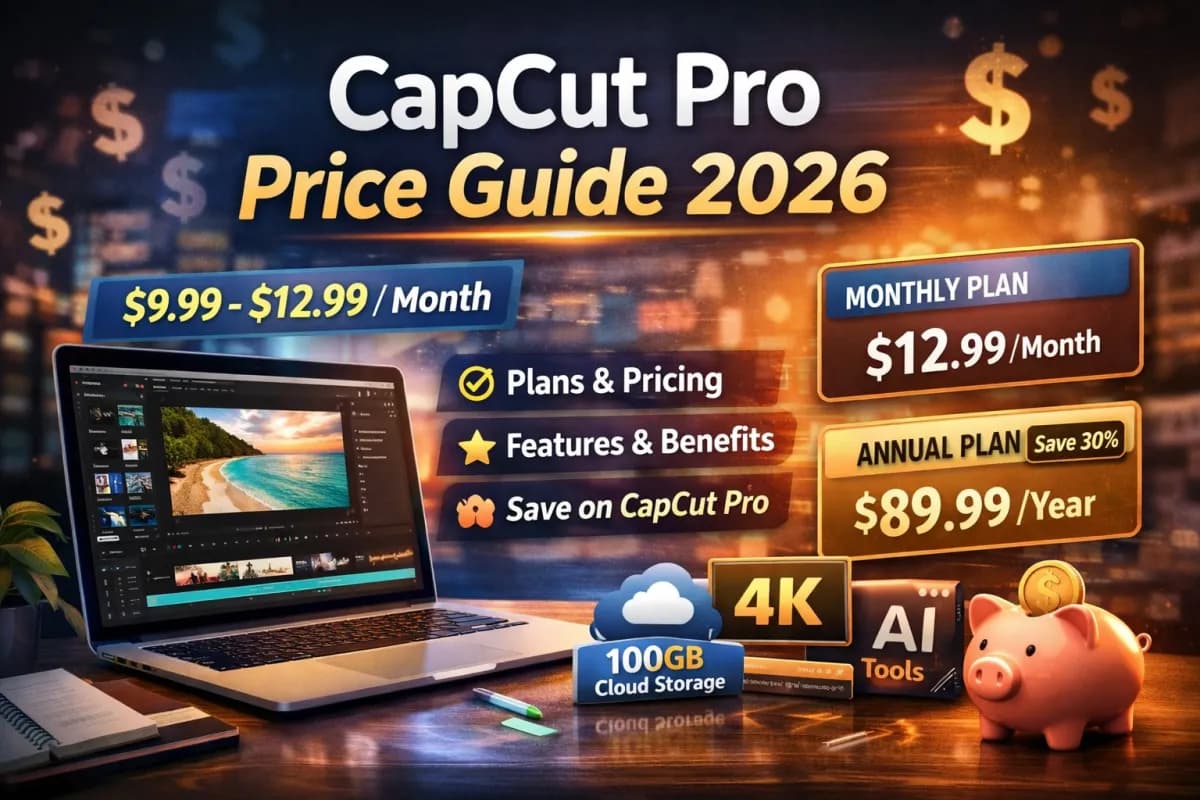
CapCut Pro gives creators access to advanced editing tools, premium effects, and cloud storage for a monthly or annual fee. CapCut Pro typically costs $9.99 to $12.99 per month, with lower pricing available when users choose an annual plan. Pricing can vary by region and platform, so the exact amount depends on where the subscription starts.
Before upgrading, it helps to understand what the paid plan includes and how it compares to the free version. CapCut Pro unlocks premium templates, video effects, filters, and up to 100GB of cloud storage, which supports larger or ongoing projects.
A closer look at the subscription plans, current pricing structure, and possible extra costs can help users decide if the upgrade fits their workflow and budget. This guide breaks down what matters most so they can make a clear and informed choice.
CapCut Pro Features and Benefits
CapCut Pro expands what users can do with video editing across desktop, mobile, and CapCut Web. It adds higher export quality, advanced AI tools, premium creative assets, cloud storage, and broader usage rights for commercial work.
Unlocking 4K Export and AI Tools
CapCut Pro allows users to export videos in 4K resolution, which improves clarity on large screens and platforms that support high‑quality playback. This matters for YouTube creators, brands, and anyone producing client work. Higher resolution helps protect fine details after compression.
The paid plan also unlocks advanced AI tools. According to the official breakdown of monthly and yearly CapCut Pro plans, subscribers gain access to premium effects, body effects, filters, and 100GB of cloud storage.
Many Pro versions also include AI features such as background removal, auto captions, and smart editing tools. These tools reduce manual work and speed up production. Users can start a project on mobile and finish it on CapCut Web without losing progress, thanks to cloud sync.
Access to Premium Templates and Stock Footage
CapCut Pro gives access to premium templates designed for social media ads, short videos, and branded content. These templates often include advanced motion graphics and polished text styles that are not available in the free version.
Users also unlock exclusive video effects and creative assets. A feature comparison of CapCut vs. CapCut Pro notes that Pro users receive premium templates and more advanced AI editing tools.
Many Pro plans include expanded access to stock footage, music, and visual elements. This reduces the need to buy assets from third‑party sites. Creators can build full projects inside CapCut without switching platforms.
Key asset benefits include:
Premium video templates
Exclusive effects and transitions
Licensed music and sound effects
Built‑in stock footage for faster editing
Commercial Licensing and Collaboration
CapCut Pro supports commercial use for many of its premium assets. This is important for freelancers, agencies, and small businesses that create paid content. Commercial licensing reduces legal risk when using templates, music, and effects in client work.
The Pro plan also includes 100GB of cloud storage, as described in the CapCut Pro plan details. Cloud storage allows teams to store and manage projects securely across devices.
Collaboration works across desktop, mobile, and CapCut Web. Team members can access shared projects, review drafts, and make edits without sending large files back and forth.
For creators who work with clients or teams, these tools support a more organized workflow:
| Feature | Benefit |
|---|---|
| Cloud storage | Access projects on multiple devices |
| Shared access | Easier team editing and review |
| Commercial rights | Safer use in paid content |
CapCut Subscription Plans Overview
CapCut offers multiple plans that fit different editing needs and budgets. Users can choose between CapCut Free, Standard, and Pro, with options available across web, mobile, and desktop.
Comparing Free, Standard, and Pro Tiers
CapCut Free gives users basic video editing tools at no cost. It includes trimming, basic transitions, simple text, and limited effects. This plan works well for casual creators or short social media clips.
Paid options expand those tools. According to a detailed breakdown of CapCut pricing 2026, paid plans begin around $9.99 per month, depending on the tier and region. These tiers unlock more advanced features and remove many creative limits.
CapCut Pro sits at the top. It includes premium effects, advanced text templates, body effects, and 100GB of cloud storage, as explained on the official page about monthly and yearly CapCut Pro plans. Pro targets users who edit often and need full access to assets and storage.
Standard usually falls between Free and Pro. It offers more tools than Free but does not include the full premium library available in Pro.
How CapCut Standard Differs From Pro
CapCut Standard expands on the free version with added templates, effects, and editing tools. It suits users who want more creative control but do not need every premium asset.
Pro removes most feature limits. It unlocks advanced filters, transitions, text styles, and body effects. It also includes full access to the premium asset library and 100GB of cloud storage for project backup and sync.
Price also separates the tiers. Some guides note that Pro pricing varies by platform and region, with differences explained in this overview of CapCut Pricing (2026): Free vs Pro. Pro typically costs more than Standard but delivers the widest toolset.
Users who create content weekly or manage client work often choose Pro for consistent access and storage space.
Web, Mobile, and Desktop Availability
CapCut runs on mobile apps, desktop software, and CapCut Web in a browser. The free plan works across platforms, though features may vary slightly by device.
Pro subscribers can use premium tools across supported platforms, depending on their subscription type. Some pricing guides explain that cross-platform access may cost more than mobile-only plans, as noted in this summary of CapCut subscription pricing plans.
CapCut Web allows users to edit without installing software. Desktop provides more processing power for larger projects. Mobile remains the most common option for short-form video.
Users should confirm whether their chosen CapCut plans include cross-platform access before subscribing.
Current CapCut Pricing Structure
CapCut offers a free tier and paid subscriptions with different features and limits. The CapCut cost depends on the plan, billing cycle, and region.
Monthly and Annual Costs
CapCut pricing includes a free version and paid Pro access. The free plan covers basic editing tools, templates, and exports, but it limits advanced AI tools and cloud storage.
Pro plans usually start around $9.99 to $12.99 per month when billed monthly. Some reports show lower promotional rates, while others list higher regional pricing. Annual billing often reduces the monthly average cost. For example, some markets list annual Pro plans near $89.99 to $179.99 per year, depending on features and region.
Several guides break down the full range of tiers, including Free, Standard, and Pro options in this detailed look at CapCut pricing in 2026.
Users who search “how much does CapCut cost” should compare monthly versus annual billing. Annual plans usually offer better value for long-term users who rely on advanced editing tools and AI features.
Regional Price Variations
CapCut subscription prices change by country. The app adjusts rates based on local currency, taxes, and market conditions.
In some regions, CapCut Standard costs around $5 per month, while Pro may reach $19 per month when billed monthly. Annual plans can range widely, from under $100 to nearly $180, depending on location and included features. This comparison of CapCut Standard vs Pro pricing shows how rates differ across plans.
Exchange rates also affect displayed prices. App stores often convert prices automatically, which can make CapCut cost more in certain countries.
Users should always check pricing inside the app. The final amount reflects local taxes and platform fees, not just the base subscription rate.
App Store Markups
App Store and Google Play purchases may include platform fees. These fees can raise the final CapCut subscription price compared to direct promotions.
Both Apple and Google typically take a percentage of in-app purchases. Developers may adjust listed prices to account for this fee. As a result, the CapCut cost inside mobile apps can differ from web-based offers or third-party sellers.
Some websites advertise discounted subscriptions, such as offers to buy CapCut Pro cheap. Buyers should review terms carefully before purchasing from any external seller. CapCut does not publicly guarantee third-party subscriptions.
Anyone asking “how much does CapCut cost on iPhone” should check the iOS App Store directly. Prices shown there include Apple’s billing structure and local taxes.
Team and Business Options
CapCut plans now include expanded Pro features aimed at professionals and marketing teams. These upgrades often include higher AI credit limits and larger cloud storage.
Recent updates increased AI credits and expanded storage up to 1TB under certain Pro plans. The platform also introduced a Standard plan for casual creators who need more tools than the free version but do not require full Pro access. CapCut outlines these changes in its overview of updated membership plans.
Business users should review storage limits, AI usage caps, and export rights before choosing a plan. Team workflows benefit from higher storage and shared access, which can justify the higher CapCut subscription cost.
Understanding Hidden and Additional Costs

The listed CapCut Pro price does not always reflect the full cost of using the platform. Buyers should review storage limits, commercial rights, and onboarding expenses before choosing between CapCut plans.
Cloud Storage and Asset Usage
CapCut Pro includes cloud storage, but storage limits can affect long-term costs. Large video files, especially 4K projects, fill space fast. Teams that work on frequent uploads may need to manage storage closely or upgrade if limits apply to their CapCut subscription.
Cloud features often tie to account level. Free users typically receive less storage, while paid plans increase limits. Details may vary by region and platform, which CapCut notes on its own CapCut Pro pricing page.
Asset libraries also matter. Some templates, music tracks, or premium effects sit behind Pro access. If a team relies on branded templates or advanced effects, losing access after a downgrade can disrupt workflow.
Users should confirm:
Cloud storage limits
Access to premium templates and effects
Download quality restrictions
Device syncing rules
These factors can create hidden costs if users assume unlimited access.
Commercial Usage Fees
Many creators use CapCut for business content, ads, and client projects. Commercial use rights can vary between free and paid CapCut plans.
The free version may limit access to certain stock assets for commercial work. Pro plans usually expand usage rights, but users should review license terms for music, fonts, and stock footage.
Some third-party assets inside CapCut carry their own rules. A video editor may create content for a paying client, but specific tracks or templates could require extra permission. That creates risk if a business publishes content without checking license details.
Teams should review:
Whether Pro includes full commercial rights
Restrictions on stock music and footage
Limits on resale or redistribution
Clear review of these terms reduces legal and financial surprises.
Implementation and Training Expenses
CapCut markets itself as easy to use, but teams still spend time learning features. That time has a cost, especially for businesses.
A company moving from another editor may need to retrain staff. Even if the CapCut subscription costs $9.99 to $19.99 per month depending on plan and platform, as noted in this CapCut Subscription Guide (2026), training hours increase the real expense.
Implementation costs may include:
| Cost Area | Example |
|---|---|
| Staff time | Learning new interface and tools |
| Workflow changes | Adjusting export settings and file storage |
| Team coordination | Managing shared assets and permissions |
For a solo creator, these costs stay low. For a 10- or 20-person team, lost time during onboarding can exceed the base CapCut Pro price in the first month.
Best Ways to Save on CapCut Pro
CapCut Pro offers several pricing options, and small choices can change the total cost by a wide margin. Users who compare billing cycles, watch for limited promotions, and review refund terms often pay much less for the same features.
A Smart Way to Save on CapCut Pro
For users who want CapCut Pro features without paying the highest official subscription price, it may be worth exploring alternative purchase options. One option is DPREMI’s CapCut Pro product page, which offers several package choices for different needs and budgets.

Depending on the selected package, users can get access to premium CapCut features, cloud storage, and AI tools at a lower entry price. DPREMI also highlights a 100% warranty for the chosen duration, which can be helpful for buyers who want extra peace of mind.
If your goal is to get CapCut Pro at a more affordable price, this option is worth comparing alongside official monthly and annual plans before making a decision.
Annual Billing Discounts
Annual billing often costs less per month than paying month to month. Many guides that break down CapCut subscription plans and pricing show that the yearly plan reduces the effective monthly rate compared to a rolling monthly plan.
For users who plan to edit videos all year, annual billing provides predictable costs. It also avoids price changes that may apply to new monthly subscribers later.
However, they should calculate the full upfront charge before committing. Annual plans require a larger single payment, even though the long‑term cost is lower.
Tip:
Choose annual billing if they expect to use CapCut Pro for 10–12 months.
Stick with monthly billing if they only need short-term access.
Third-Party and One-Time Payment Options
Discount platforms often list short-term deals on CapCut Pro. Some sites advertise limited-time offers such as 30% Off CapCut Coupons, which can reduce the first billing cycle cost.
CapCut has also promoted desktop-only deals like the CapCut Black Friday Sale with 40% off Pro. These offers usually apply to first-time Pro subscribers and may only discount the first month.
Users should read the terms carefully. Many promotions apply to:
New accounts only
Desktop subscriptions
First month of a recurring plan
CapCut Pro mainly runs on a subscription model. It does not commonly offer a true one-time lifetime payment through official channels, so buyers should be cautious with unofficial “lifetime” claims.
Trial Periods and Refund Considerations
CapCut sometimes offers a trial period before charging for Pro features. This allows users to test advanced tools such as premium templates, AI features, and higher export quality without paying immediately.
They should check how long the trial lasts and when billing begins. Subscriptions often renew automatically unless canceled before the end date.
Refund policies vary by platform. Desktop purchases, app store subscriptions, and third-party billing systems may follow different rules. Users must review cancellation terms inside their account settings before purchasing.
To avoid extra charges, they should:
Mark the trial end date.
Cancel at least 24 hours before renewal if they do not want to continue.
Keep payment confirmations for reference.
About CapCut and Its Ecosystem
CapCut operates inside a larger system built by ByteDance, the company behind TikTok. Its ownership, platform ties, and pricing changes all shape how users experience CapCut Pro and how much they pay.
The Role of ByteDance
ByteDance owns CapCut and TikTok. It launched CapCut in 2019 under the name JianYing, then expanded it for global users.
As a parent company, ByteDance controls product updates, feature rollouts, and pricing strategy. It uses shared AI research across its apps. This includes tools for auto captions, background removal, and video enhancement.
ByteDance also funds large cloud systems. These systems support storage, syncing, and team features inside CapCut Pro. That scale helps CapCut compete with other editing apps on desktop, mobile, and web.
Because ByteDance runs both the editing tool and the social platform, it can align features with short‑form video trends. This link influences how CapCut pricing tiers bundle AI tools, templates, and storage.
CapCut’s Connection to TikTok
CapCut connects closely to TikTok. Many creators use it to edit vertical videos before posting.
The apps share design choices and export settings. CapCut offers aspect ratios, templates, and effects that match TikTok’s feed. This reduces extra steps for creators.
CapCut also supports direct export to TikTok. That tight link makes it attractive for influencers and social media managers.
This relationship helps explain why CapCut Pro focuses on trending templates, AI captions, and music tools. Users who post often on TikTok may see more value in Pro because it saves editing time and keeps content aligned with platform trends.
Evolution of CapCut’s Pricing Model
CapCut started as a mostly free editor. Over time, it added paid tiers as it expanded AI tools and cloud storage.
Recent updates split plans into Free, Standard, and Pro in some regions. Several industry breakdowns, such as this CapCut pricing 2026 guide, explain how features now differ across tiers.
Current Pro pricing often includes:
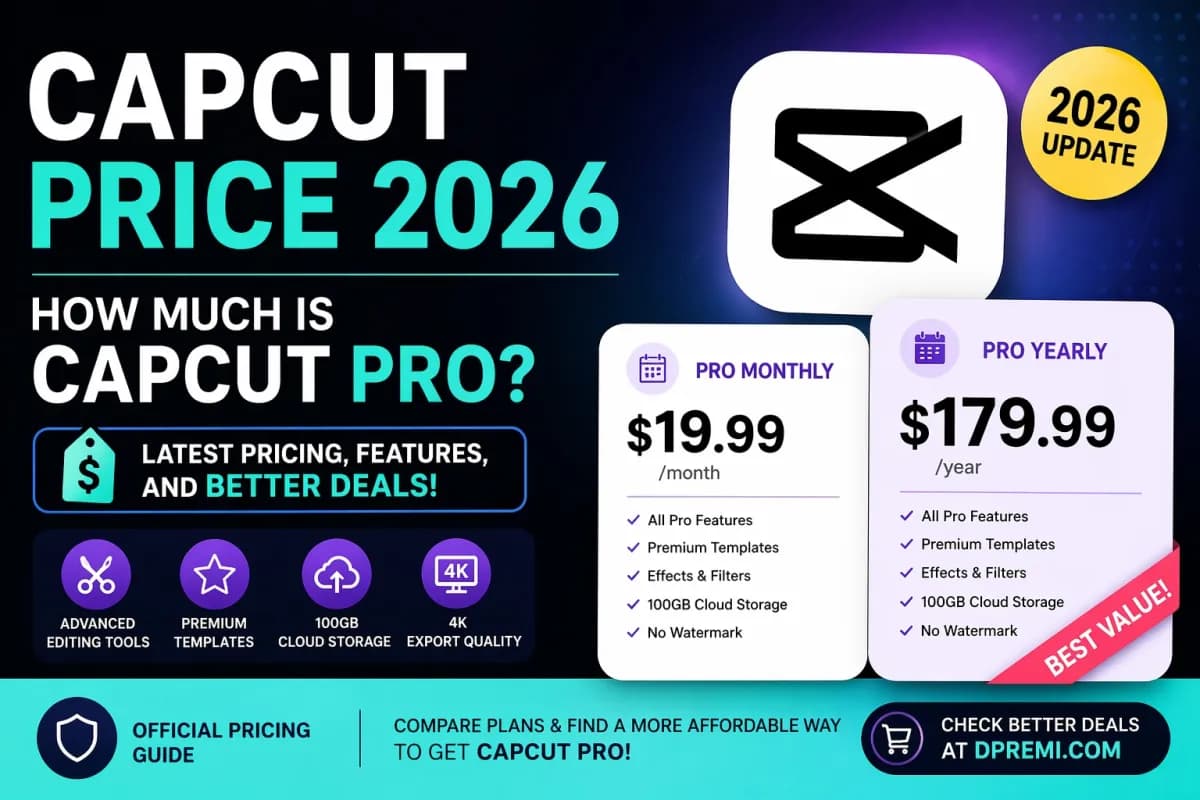
Monthly plan: $19.99 per month
Yearly plan: $179.99 per year
Team plan: starting around $24.99 per month
Details appear in this CapCut Standard vs Pro comparison, which outlines storage limits and AI tool access.
These changes show a clear shift. CapCut now treats advanced AI tools, large cloud storage, and team features as paid benefits under CapCut Pro, rather than free extras.
Frequently Asked Questions
CapCut Pro offers monthly and yearly subscriptions with fixed pricing and defined features. Costs vary by plan type, platform, and current promotions, and users must choose between free access and paid tools based on their editing needs.
What subscription plans are available, and what does each one include?
CapCut Pro offers two main subscription options: monthly and annual plans. Both unlock premium tools, effects, and cloud storage.
According to CapCut’s official help page on monthly and yearly plans, both plans include full access to advanced editing features and 100GB of cloud storage. Users can access premium text templates, video effects, body effects, filters, and ongoing updates.
The monthly plan allows users to pay month to month. The annual plan provides access for a full year at a lower average monthly cost.
Is there a lifetime option, or is it subscription-only?
CapCut Pro does not offer a lifetime purchase option. It operates on a subscription-only model.
A breakdown of CapCut Pro pricing in 2026 shows that users can choose either $9.99 per month or $89.99 per year. The annual plan reduces the effective monthly cost compared to paying every month.
Users must keep an active subscription to maintain access to Pro features.
How does the cost compare between the Standard plan and the Pro plan?
CapCut has separated its paid tiers into Standard and Pro in recent updates. The Pro plan includes more advanced tools and AI features than Standard.
An updated guide to CapCut pricing in 2026 explains that Pro targets users who need advanced editing tools and expanded creative assets. The Standard plan typically costs less but includes fewer premium features.
The exact price difference depends on region and platform. Pro remains the higher-tier option.
Does the pricing differ on PC versus mobile, and what causes the difference?
Pricing can vary depending on the platform used to subscribe. Mobile app stores may apply their own fees or regional pricing rules.
A detailed overview of CapCut subscription price differences explains that costs can change based on platform, payment method, and local currency conversion. App Store and Google Play pricing may not always match direct web purchases.
Regional taxes and exchange rates can also affect the final amount charged.
Are there student discounts or other promotions available?
CapCut does not consistently advertise a permanent student discount. Promotions may appear during special events or limited campaigns.
Some pricing guides, such as this overview of CapCut pricing tiers, note that pricing and offers change over time. Users should check the official CapCut website or app for current discounts.
Free trials may also be available in some regions.
Is the subscription fee worth it compared to the free version for typical editing needs?
The free version supports basic editing tasks such as trimming, transitions, and standard exports. Many casual users can complete simple projects without paying.
A feature comparison in this CapCut vs. CapCut Pro guide shows that Pro adds premium effects, advanced templates, and expanded tools. Users who create content often or rely on specific effects may find the paid plan more practical.
For occasional editing, the free version may meet most needs.